---
title: "How to Change the Default World on PocketMine-MP"
description: "Learn how to easily change the default world (level-name) on your PocketMine-MP server using the server.properties file on the Winheberg gaming panel."
category: jeux
subcategory: minecraft-bedrock
docGroup: pocketmine
docGroupIcon: tabler:brand-minecraft
icon: tabler:file-text
date: 2026-07-24
author: Winheberg
slug: "change-default-world-pocketmine"
order: 54
image: /statics/images/docs/en/gaming/minecraft-bedrock/change-default-world-pocketmine.webp
tags: [pocketmine, minecraft, configuration, world, gaming-panel]
keywords: [change default world pocketmine, level-name pocketmine-mp, minecraft bedrock server, winheberg gaming panel, change map pocketmine, multiworld configuration]
link_fr: "/docs/minecraft-bedrock/changer-monde-par-defaut-pocketmine"
---
## Context
By default, during its initial startup, a PocketMine-MP server automatically generates a standard world named `world`. If you wish to import a custom adventure map, a mini-games arena, or simply switch from one environment to another, you must modify the server's root configuration.
This change is performed via a specific directive within the main configuration file, allowing the core engine to target the correct storage directory.
## Accessing Server Files
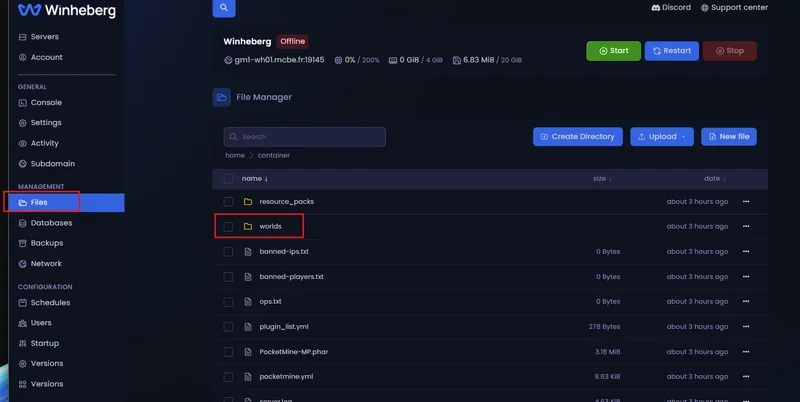
All folder and text file manipulations take place directly from your hosting management interface.
1. Log in to the [panel.winheberg.com](https://panel.winheberg.com/).
2. Select your PocketMine-MP server instance.
3. In the left sidebar menu, click on the **`File manager`** tab.
 ## Changing the Default World: Step-by-Step Guide
To ensure the server correctly loads your new map during the process initialization, carefully follow these steps.
### 1. Identify the Exact Map Name
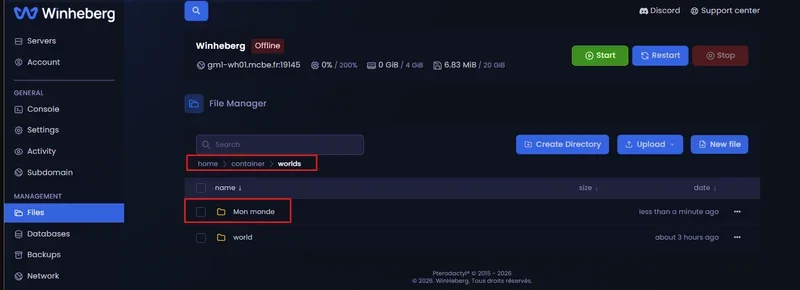
Before modifying the configuration, navigate to the folder named **`/worlds`** via your file manager. Note down the exact name of the directory containing your target world.
> [!IMPORTANT]
> The PocketMine-MP file system is strictly case-sensitive. If your folder is named `Adventure_Map`, typing `adventure_map` will cause an indexing error or trigger the automatic generation of a new blank map.
## Changing the Default World: Step-by-Step Guide
To ensure the server correctly loads your new map during the process initialization, carefully follow these steps.
### 1. Identify the Exact Map Name
Before modifying the configuration, navigate to the folder named **`/worlds`** via your file manager. Note down the exact name of the directory containing your target world.
> [!IMPORTANT]
> The PocketMine-MP file system is strictly case-sensitive. If your folder is named `Adventure_Map`, typing `adventure_map` will cause an indexing error or trigger the automatic generation of a new blank map.
 ### 2. Open the server.properties File
Return to the root of your server (`/`) and locate the primary configuration document:
```properties
server.properties
```
Click on it to open it within the text editor integrated into the Winheberg panel.
### 3. Modify the level-name Directive
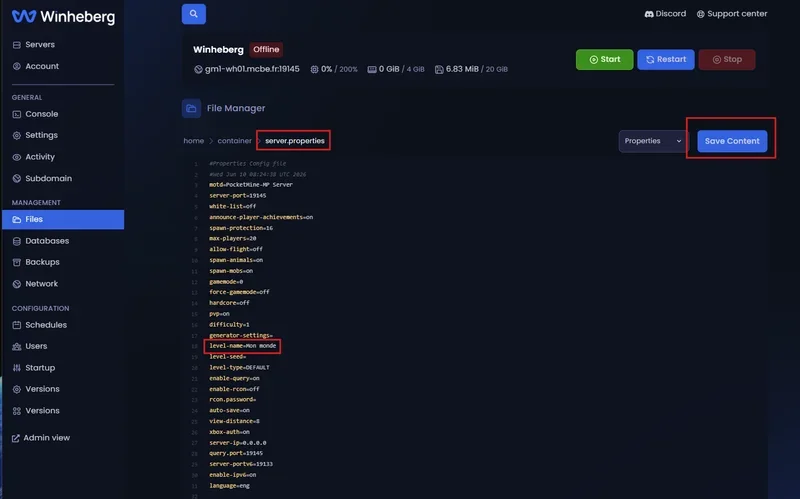
Scroll through the file until you locate the line containing the `level-name` key. By default, it is generally found around line 18 and looks like this:
```ini
level-name=world
```
Replace the default value with the exact name of your previously identified world folder:
```ini
level-name=Adventure_Map
```
### 2. Open the server.properties File
Return to the root of your server (`/`) and locate the primary configuration document:
```properties
server.properties
```
Click on it to open it within the text editor integrated into the Winheberg panel.
### 3. Modify the level-name Directive
Scroll through the file until you locate the line containing the `level-name` key. By default, it is generally found around line 18 and looks like this:
```ini
level-name=world
```
Replace the default value with the exact name of your previously identified world folder:
```ini
level-name=Adventure_Map
```
 ### 4. Save and Restart
- At the top or bottom right of the web editor, click the **`Save Content`** button (or use the standard shortcut Ctrl + S).
- Next, head over to the **`Console`** tab in the sidebar menu.
- Click the **`Restart`** button to permanently apply the changes.
## World Management Variables Summary Table
| Parameter | Source File | Description | Application Role |
| :--- | :--- | :--- | :--- |
| **`level-name`** | `server.properties` | Defines the subfolder of the `/worlds` directory loaded at startup. | Default spawn point for newly connecting users. |
| **`level-type`** | `server.properties` | Algorithmic generation type of the world (DEFAULT, FLAT). | Active only if the folder defined in `level-name` does not exist yet. |
## Troubleshooting
### ❌ The Server Generates a New Empty Map or Reverts to the Old World
- **Root Directory Error**: Ensure your custom map folder is located inside the `/worlds` directory and not at the root of your FTP server.
- **Case Sensitivity Mismatch**: The PocketMine-MP engine will fail to recognize the folder if spelling is imperfect. Double-check uppercase, lowercase, and symbols between the folder name and the `level-name` variable.
### ❌ Missing Map Chunks or Crash Upon Server Startup
- **Active Process During Transfer**: Uploading or renaming files while the instance is online causes synchronous writing conflicts that will corrupt the world. Fully turn off the server before altering configuration directives.
## Administrative Best Practices
- **Standardized Nomenclature**: Although PocketMine-MP tolerates spaces, opt for a space-free nomenclature using underscores or hyphens (e.g., `Adventure_Map` instead of `Adventure Map`) to avoid conflicts with future add-ons and plugins.
- **System Restore Points**: Systematically generate a manual backup via the panel's **Backups** tab before modifying environment variables to secure your existing world data.
- **Level Type Verification**: If generating a flat world using the `level-type=FLAT` key, make sure to delete any existing folder with that name so the engine can properly apply the new generation algorithm.
## Need Help?
Managing and indexing your virtual worlds requires structural discipline to preserve the data integrity of your players.
If your modifications are not being registered or if you encounter import issues, our teams remain at your disposal. You can submit a support ticket to our **Technical** department from your client area at [billing.winheberg.com](https://billing.winheberg.com) by attaching your PocketMine-MP subscription for personalized expert assistance.
Happy administration and have a great game on your Winheberg infrastructure! 🎮
### 4. Save and Restart
- At the top or bottom right of the web editor, click the **`Save Content`** button (or use the standard shortcut Ctrl + S).
- Next, head over to the **`Console`** tab in the sidebar menu.
- Click the **`Restart`** button to permanently apply the changes.
## World Management Variables Summary Table
| Parameter | Source File | Description | Application Role |
| :--- | :--- | :--- | :--- |
| **`level-name`** | `server.properties` | Defines the subfolder of the `/worlds` directory loaded at startup. | Default spawn point for newly connecting users. |
| **`level-type`** | `server.properties` | Algorithmic generation type of the world (DEFAULT, FLAT). | Active only if the folder defined in `level-name` does not exist yet. |
## Troubleshooting
### ❌ The Server Generates a New Empty Map or Reverts to the Old World
- **Root Directory Error**: Ensure your custom map folder is located inside the `/worlds` directory and not at the root of your FTP server.
- **Case Sensitivity Mismatch**: The PocketMine-MP engine will fail to recognize the folder if spelling is imperfect. Double-check uppercase, lowercase, and symbols between the folder name and the `level-name` variable.
### ❌ Missing Map Chunks or Crash Upon Server Startup
- **Active Process During Transfer**: Uploading or renaming files while the instance is online causes synchronous writing conflicts that will corrupt the world. Fully turn off the server before altering configuration directives.
## Administrative Best Practices
- **Standardized Nomenclature**: Although PocketMine-MP tolerates spaces, opt for a space-free nomenclature using underscores or hyphens (e.g., `Adventure_Map` instead of `Adventure Map`) to avoid conflicts with future add-ons and plugins.
- **System Restore Points**: Systematically generate a manual backup via the panel's **Backups** tab before modifying environment variables to secure your existing world data.
- **Level Type Verification**: If generating a flat world using the `level-type=FLAT` key, make sure to delete any existing folder with that name so the engine can properly apply the new generation algorithm.
## Need Help?
Managing and indexing your virtual worlds requires structural discipline to preserve the data integrity of your players.
If your modifications are not being registered or if you encounter import issues, our teams remain at your disposal. You can submit a support ticket to our **Technical** department from your client area at [billing.winheberg.com](https://billing.winheberg.com) by attaching your PocketMine-MP subscription for personalized expert assistance.
Happy administration and have a great game on your Winheberg infrastructure! 🎮