---
title: "How to install mods (Workshop) on your Unturned server"
description: "Easily install mods on your Winheberg Unturned server using the WorkshopDownloadConfig.json file and the Steam Workshop."
category: jeux
subcategory: unturned
icon: tabler:file-text
date: 2026-07-24
author: Winheberg
slug: "install-mods-unturned-workshop"
order: 47
image: /statics/images/docs/en/gaming/unturned/install-mods-unturned-workshop.webp
tags: [Unturned, Mods, Workshop]
keywords: [unturned server, install unturned mods, unturned workshop, workshopdownloadconfig, pterodactyl unturned, winheberg]
link_fr: "/docs/unturned/installer-mods-unturned-workshop"
---
## Context
Unturned offers a vast catalogue of community-made content to enrich its post-apocalyptic universe. Adding mods to your server lets you bring in new maps, original vehicles or custom weapons for your players.
On your server hosted with Winheberg, the installation is fully automated through a dedicated configuration file. The server takes care of downloading and updating Steam Workshop items on every startup. Instead of manually transferring heavy files, you simply tell the server which items to fetch.
> [!TIP]
> This method guarantees that your server always runs the latest version of the mods and forces your players to download exactly the same files when they connect.
## Requirements
- An active Unturned server on your Winheberg panel
- A Steam account to browse the Workshop
- A server that has been started at least once to generate its configuration files
## 1. Get the mod identifier on Steam
Head to the Steam Workshop page dedicated to Unturned and look for the mod you want to install. In our example, it is the mod « KJ Police Vehicles ».
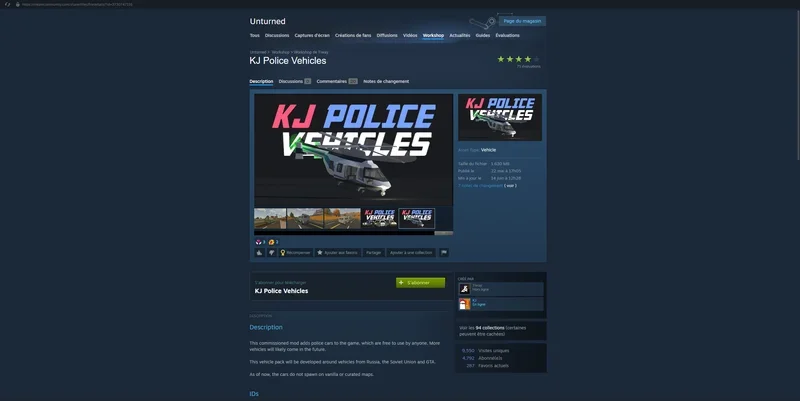 Look at the page URL at the top of your browser. The mod's unique identifier is the string of digits located at the very end of the link, right after `?id=`. Copy this string of digits.
 ## 2. Open the configuration file
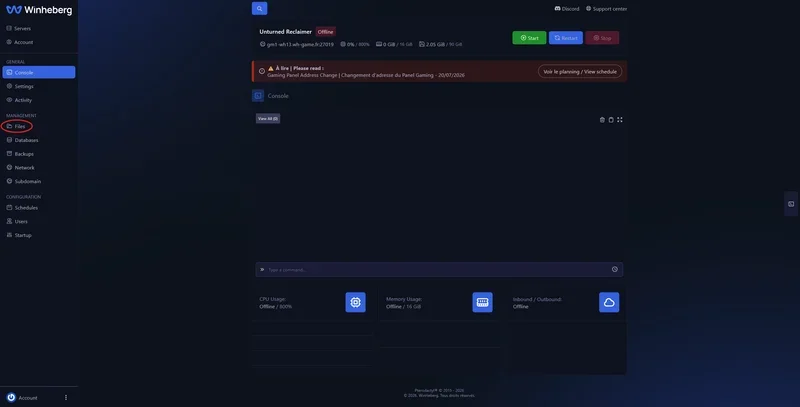
Log in to your Winheberg gaming panel [https://panel.winheberg.com/](https://panel.winheberg.com/) and open the file manager of your Unturned server.
## 2. Open the configuration file
Log in to your Winheberg gaming panel [https://panel.winheberg.com/](https://panel.winheberg.com/) and open the file manager of your Unturned server.
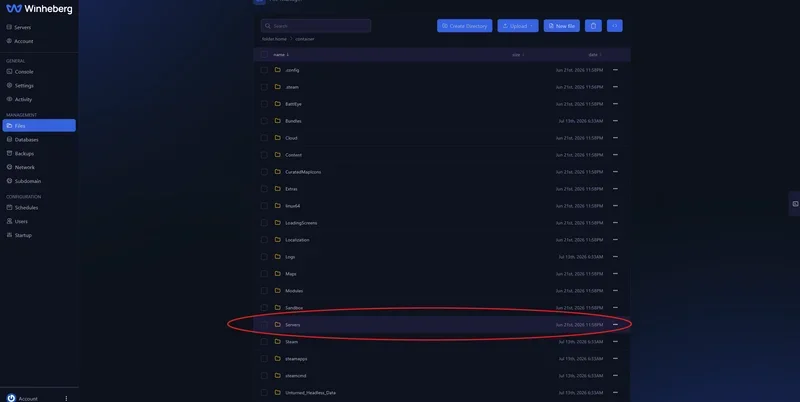
 Open the `Servers` folder.
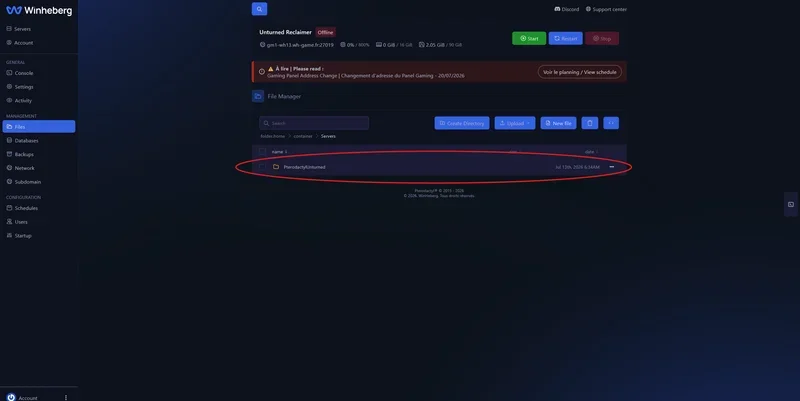
 Then enter your instance folder, usually named `PterodactylUnturned`.
 Locate the file named `WorkshopDownloadConfig.json`.
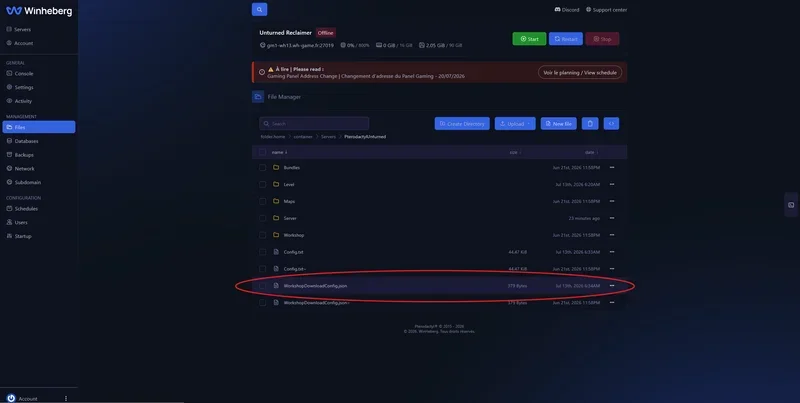 Click on it to open it in the panel's text editor.
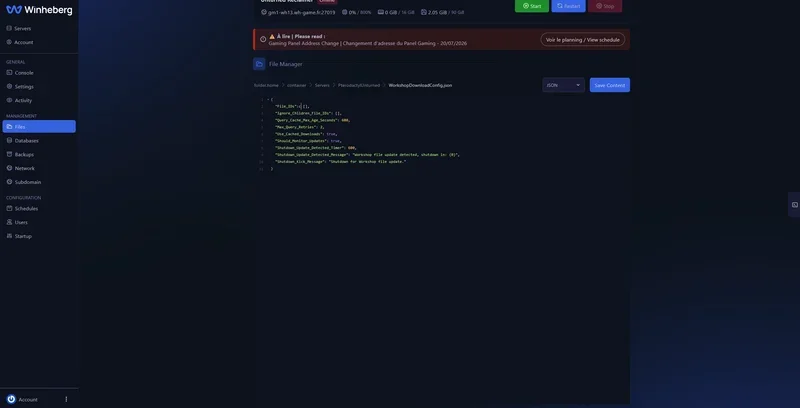 > [!NOTE]
> If this file does not exist, start your server at least once since its installation so that it gets generated.
## 3. Add the mods to the file
The file opens in JSON format. Insert the identifier you copied in the previous step into the `File_IDs` section.
> [!NOTE]
> If this file does not exist, start your server at least once since its installation so that it gets generated.
## 3. Add the mods to the file
The file opens in JSON format. Insert the identifier you copied in the previous step into the `File_IDs` section.
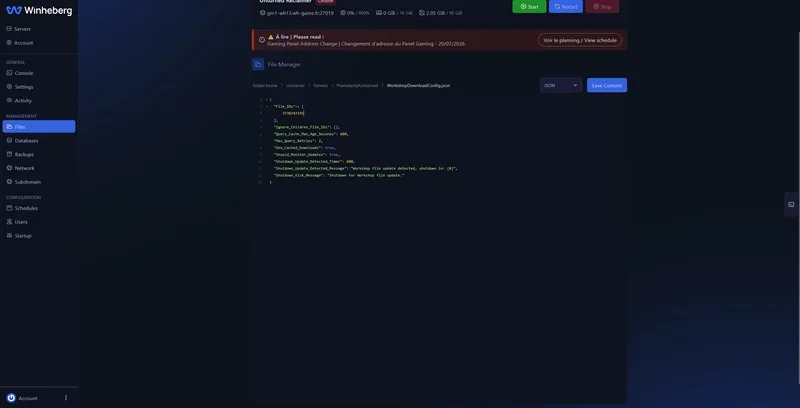 To install several mods, separate each identifier with a comma. The last identifier in the list must not have any comma after it.
```json
{
"File_IDs": [
123456789,
987654321
],
"Ignore_Children_File_IDs": [],
"Maximum_Dependencies": 10,
"Maximum_Download_Retries": 3
}
```
Then click the save button to apply your changes.
To install several mods, separate each identifier with a comma. The last identifier in the list must not have any comma after it.
```json
{
"File_IDs": [
123456789,
987654321
],
"Ignore_Children_File_IDs": [],
"Maximum_Dependencies": 10,
"Maximum_Download_Retries": 3
}
```
Then click the save button to apply your changes.
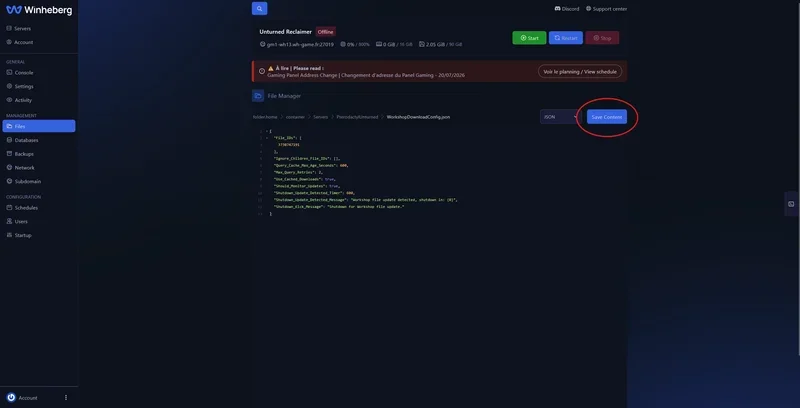 Finally, restart your server. On the next startup, it will automatically download the listed mods from the Steam Workshop.
## Troubleshooting
### ❌ The WorkshopDownloadConfig.json file is nowhere to be found
The file does not appear in your instance folder.
- Make sure your server has been started at least once since its installation
- Check that you are browsing the right folder, `Servers` then the `PterodactylUnturned` instance
- Reload the file manager page to refresh the display
### ❌ The server does not load the mods after editing
A syntax error in the JSON file prevents it from being read correctly.
- Check that no comma remains after the last identifier in the list
- Make sure each identifier is separated from the next by a comma
- Confirm that the `[` and `]` brackets of the `File_IDs` section are properly closed
### ❌ A mod does not download on startup
The server starts but the expected content is still missing.
- Check that the copied identifier matches exactly the digits located after `?id=`
- Confirm that the mod is still available and public on the Steam Workshop
- Restart the server to trigger the download phase again
## Need help?
If the download of your mods keeps failing despite these checks, our support team is available. Open a ticket from your client area [https://billing.winheberg.com](https://billing.winheberg.com) by selecting the **Technique** department, then fill in your Unturned server in the **Related Product** field.
Your players can now discover brand new content on your Unturned server. 🎮
Finally, restart your server. On the next startup, it will automatically download the listed mods from the Steam Workshop.
## Troubleshooting
### ❌ The WorkshopDownloadConfig.json file is nowhere to be found
The file does not appear in your instance folder.
- Make sure your server has been started at least once since its installation
- Check that you are browsing the right folder, `Servers` then the `PterodactylUnturned` instance
- Reload the file manager page to refresh the display
### ❌ The server does not load the mods after editing
A syntax error in the JSON file prevents it from being read correctly.
- Check that no comma remains after the last identifier in the list
- Make sure each identifier is separated from the next by a comma
- Confirm that the `[` and `]` brackets of the `File_IDs` section are properly closed
### ❌ A mod does not download on startup
The server starts but the expected content is still missing.
- Check that the copied identifier matches exactly the digits located after `?id=`
- Confirm that the mod is still available and public on the Steam Workshop
- Restart the server to trigger the download phase again
## Need help?
If the download of your mods keeps failing despite these checks, our support team is available. Open a ticket from your client area [https://billing.winheberg.com](https://billing.winheberg.com) by selecting the **Technique** department, then fill in your Unturned server in the **Related Product** field.
Your players can now discover brand new content on your Unturned server. 🎮