Context
Locations in Pterodactyl allow you to group and organize your different Nodes (compute nodes or dedicated systems) based on geographical zones, network infrastructures, or data centers. Creating at least one operational Location is a mandatory prerequisite step before you can configure and pair a new Node to your deployment panel.
1. Access the Admin Panel
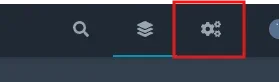
Log in to your Pterodactyl panel dashboard. Access the global administrative layout by clicking on the gear icon located at the top right corner of the user interface.
2. Navigate to the Locations Section
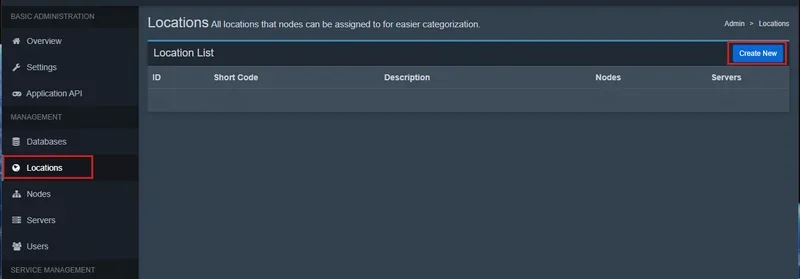
Inside the administrative left sidebar layout menu:
- Click on the
navigation tab.Locations - At the top right area of the management view, click on the
button.Create New
3. Fill Out the Creation Form
Complete the two required input fields to register your structural zone:
- Short Code : Type a short, unique identifier using lowercase characters (avoid spaces, punctuation, or symbols). This key acts as a technical indicator and API identifier mapping.
Example:
orfr-pareu-west-1 - Description : Include a more detailed descriptive string to easily identify the physical hosting site or server provider layout.
Example:
Paris Data Center - (Winheberg Infrastructure Node)
Click the green
Create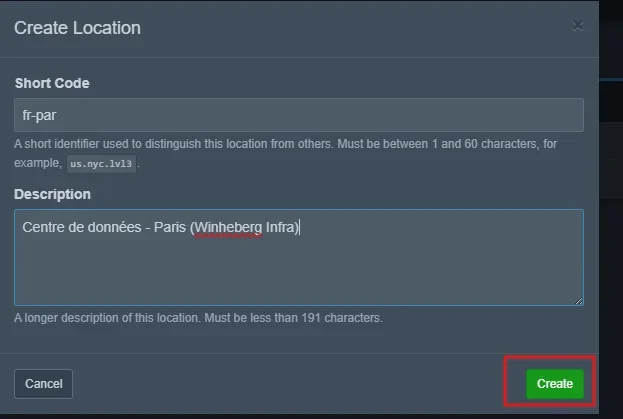
Once successfully saved, the Location entry becomes instantly available within selection dropdown menus when provisioning your future physical systems or hosting nodes.
Troubleshooting
❌ "The short code has already been taken" validation error
- Duplicate Identifier: The chosen
is already assigned to another active Location profile inside your configuration database. Short codes must strictly be unique to prevent API routing or indexing collisions. Adjust the tag string slightly (e.g., append an index indicator:Short Code
).fr-par-2
❌ System rejects deletion of an established Location entry
- Linked Nodes Hindrance: Pterodactyl explicitly blocks the deletion of a Location slot if active Nodes remain linked to it. You must reconfigure your active nodes to map them to an alternative zone path first, or clear empty nodes prior to discarding the master location category.
Administrative Best Practices
- Implement Standardized Naming Frameworks: Rely on consistent nomenclature syntax patterns reflecting geographical presence alongside a scale index (e.g., using
for a primary cluster segment based in Gravelines). This maintains indexing clarity as your enterprise server system expands.eu-gra-1 - Logical Cluster Aggregation: If your deployment controls multiple virtual private servers or dedicated host items running under the same provider facility, bind them underneath the exact same Location directory. Only deploy separate entries to signal concrete geographical network shifts.
- Automated Deployment Integration: Pterodactyl references Locations to distribute automated game server instances across the least occupied nodes inside a specified perimeter box via API tasks. Keeping zones properly managed optimizes server load balance across your VPS fleet.
Need help?
Structuring deployment parameters and establishing clean location groups is vital to run an organized container environment.
If you hit any blocking issues while building tracking zones or linking target node machines, our technical support desk is available to assist. Open an official support ticket inside your client profile area over at billing.winheberg.com to get timely technical assistance.
Your brand new Location environment is now fully established and ready to host its first Nodes! 🎮