Context
Two settings shape what your FiveM server can do. OneSync is the sync system that lets the server track the state of every player and entity, and host more players than it could without OneSync. Many recent resources need it to start, such as ox_lib, ox_inventory or the Qbox framework. The game build sets which version of GTA V your players load, and therefore which vehicles, maps and content from GTA Online updates are available on your server.
This guide shows you how to check OneSync and choose the game build of your Winheberg FiveM server, with or without txAdmin, then how to make sure both settings are applied.
Prerequisites
- A Winheberg FiveM server with a valid License Key (see "How to generate your FiveM License Key on the Cfx.re portal")
- Access to the Winheberg panel
- Recent artifacts, especially if you are aiming for a recent game build (see our guide "How to update your FiveM server's artifacts")
1. Find out whether your server uses txAdmin
Where you set OneSync depends on whether your server uses txAdmin. In the panel, open Startup and look at the ENABLE TXADMIN switch.
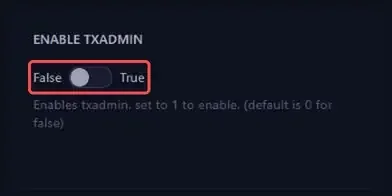
| ENABLE TXADMIN | OneSync | Game build |
|---|---|---|
| False | server.cfg file |
server.cfg file |
| True | txAdmin Settings page | server.cfg file managed by txAdmin |
To switch from one mode to the other, follow our guide "How to enable txAdmin on your FiveM server?".
2. Check that OneSync is enabled
On recent artifacts, OneSync is enabled by default in on mode. In most cases there is nothing to change. Just make sure no setting turns it off.
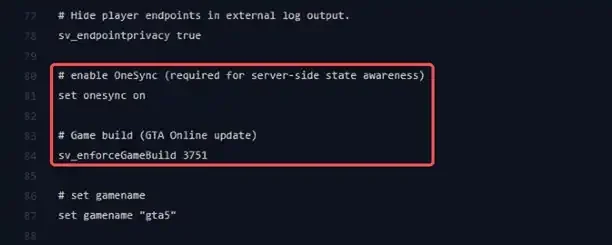
Open Files, then the server.cfg file at the root of the server. The file created by Winheberg already contains the following line, near the end. If it says off or legacy, change the value to on. If the line is gone, OneSync stays enabled by default, but you can add it back so the setting is visible.
set onesync on
Click Save Content, then restart the server from Console.
As long as a onesync line is in server.cfg, the console shows this message on startup. You can ignore it. Despite what it says, the value on the line is applied.
Warning: 'onesync' is an internal ConVar and cannot be changed.
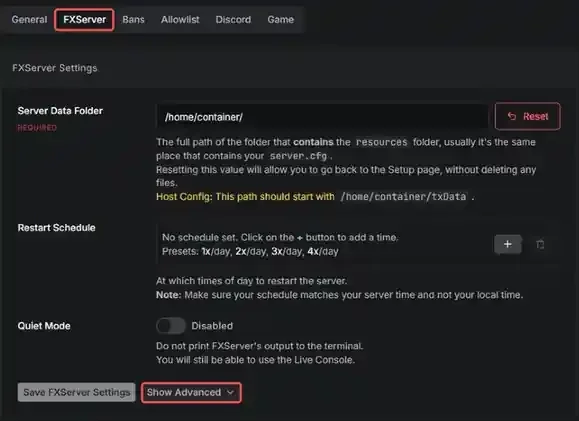
Open txAdmin, then Settings and the FXServer tab. The OneSync setting is part of the advanced options, click Show Advanced to display them.
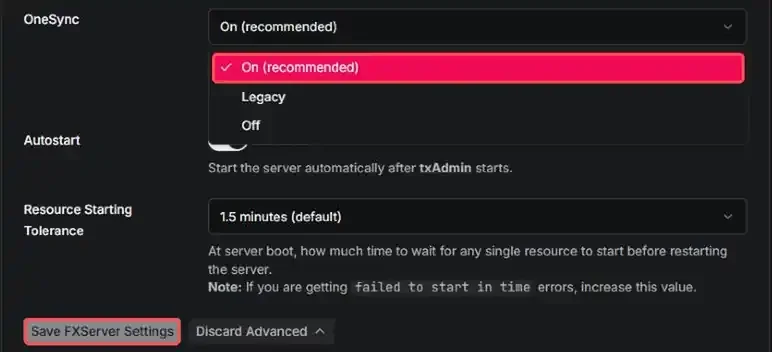
Pick On (recommended) in the OneSync menu. Click Save FXServer Settings, then restart the server from txAdmin.
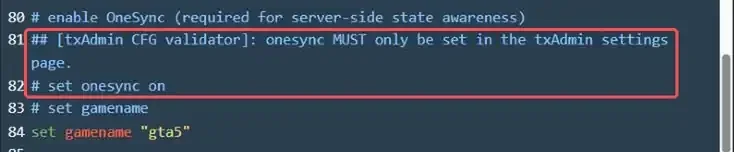
With txAdmin, OneSync is only set from this page. If your server.cfg contains a onesync line, txAdmin comments it out on startup and adds this message right above it, visible in CFG Editor.
## [txAdmin CFG validator]: onesync MUST only be set in the txAdmin settings page.
| Value | Effect |
|---|---|
on |
Recommended mode, the server knows the state of everyone and can host up to 2048 players depending on your subscription |
legacy |
Compatibility mode for older scripts, discouraged by Cfx.re (performance issues and graphical glitches) |
off |
No OneSync, the server only acts as a relay between players |
The free License Key allows up to 48 players with OneSync. Beyond that, you need a FiveM Element Club Argentum subscription or higher on the Cfx.re portal. Then simply raise the MAX PLAYERS variable in Startup.
3. Choose the game build
The game build is set with the sv_enforceGameBuild line in server.cfg. Without txAdmin, this is the server.cfg at the root of the server. With txAdmin, open the file from CFG Editor in the txAdmin menu. Add the line with the build number you want, for example right under set onesync on, or edit it if it is already there.
sv_enforceGameBuild 3751
Each build includes all the content of the previous builds. Here are the main ones, with the name of the GTA Online update they bring.
| Build | GTA Online update |
|---|---|
1 |
Base game without DLC |
1604 |
Arena War |
2060 |
Los Santos Summer Special |
2189 |
Cayo Perico Heist |
2372 |
Los Santos Tuners |
2545 |
The Contract |
2699 |
The Criminal Enterprises |
2802 |
Los Santos Drug Wars |
2944 |
San Andreas Mercenaries |
3095 |
The Chop Shop |
3258 |
Bottom Dollar Bounties |
3407 |
Agents of Sabotage |
3570 |
Money Fronts |
3751 |
A Safehouse in the Hills |
3889 |
The Kortz Center Heist |
The game build is only applied when the server starts. After each change, save the file then fully restart the server. The next time they connect, your players automatically load the content of the chosen build.
Always set a specific build. Without the sv_enforceGameBuild line, the server loads the default build of your artifacts, which is not necessarily the latest one (3258 in our tests) and can change after an artifacts update. Resources that expect a given build can then stop working.
If your server runs FiveM for GTAV Enhanced, only the latest build is available, and it is loaded by default. You can still set the value 1 to go back to the base game without DLC. On this version, OneSync is always enabled.
4. Check that the settings are applied
Once the server has started, open the following address in your browser. Replace ADDRESS:PORT with the address shown at the top of your server's page in the panel, in the gm1-whXX.wh-game.fr:30XXX format.
http://ADDRESS:PORT/info.json
The server answers with its public settings, on a single line. Look for these two values with Ctrl+F.
"onesync_enabled":"true"
"sv_enforceGameBuild":"3751"
onesync_enabled is true when OneSync is enabled, and sv_enforceGameBuild shows the build the server actually loaded.
If you run into trouble
When a resource does not get the OneSync setting or game build it needs, the console shows a red error at server startup and the resource is not started.

❌ A resource refuses to start because of OneSync
The console shows this message when the resource starts, here with ox_lib.
Resource 'ox_lib' can't run:
  1. onesync: OneSync needs to be enabled
Couldn't start resource ox_lib.
- Set OneSync to
onby following step 2 - With txAdmin, check the setting in Settings. A
onesyncline inserver.cfghas no effect, since txAdmin comments it out - Fully restart the server
❌ A resource asks for a more recent game build
Some resources set a minimum build in their fxmanifest.lua, for example /gameBuild:h4 for build 2189. If your build is older, the console shows a message like this one.
Resource 'vehicle_pack' can't run:
  1. gameBuild(3889): sv_enforceGameBuild needs to be at least 3889 (current is 3751)
- Raise the
sv_enforceGameBuildvalue to the requested build or higher - Restart the server
❌ Players can no longer join after a build change
The server accepts any number in sv_enforceGameBuild, without showing an error on startup. A typo therefore goes unnoticed on the server side.
- Check that the value is in the official list of game builds (FiveM documentation, Server Commands page)
- Check the value actually loaded with
info.json(step 4) - Update the artifacts from the Artifacts tab of the panel if you are aiming for a very recent build
❌ Unable to go beyond 48 players
- Check that your Cfx.re account has a FiveM Element Club Argentum subscription or higher
- Check that OneSync is set to
on,legacymode cannot go beyond 64 players - Raise MAX PLAYERS in Startup, then restart
Best practices
- Choose the game build before installing your resources, then stick with it, since changing builds can alter the available vehicles and maps
- Keep OneSync set to on, since Cfx.re considers the legacy and off modes deprecated
- Update your artifacts regularly, recent builds are only recognized by recent artifacts
- Take a backup from the Backups tab before editing
server.cfg
Need help?
If a resource still refuses to start, our team can help. Open a ticket in the Technical department from your client area, fill in the Related Product field with the server in question, and include the message shown in the console.
Your FiveM server is ready for the latest resources 🎮