Context
A "seed" is the unique numerical sequence that governs the structural generation, biome placement, and terrain layout of your Minecraft Java world. Whether you plan to use modern 2026 external analysis mapping tools (such as Chunkbase) or duplicate a map, you will need to retrieve this data string. Here are all the ways to find it, from standard admin commands to reverse-engineering utilities for public servers.
Method 1: Via the In-Game Command (OP / Cheats Enabled)
If you are logged into your server (and OP) or on a single-player world where cheats were allowed during world creation, this is the quickest route available.
- Join your Minecraft Java world.
- Open your live chat box and input the following command:
/seed - The server will print out your seed. You can simply click on the numbers within the chat window to copy it to your clipboard.
Method 2: In Single-Player WITHOUT Cheats Enabled (LAN World Trick)
If you are playing a single-player survival world (or a local backup of your server) and cheats were disabled when you created the map, the /seed command will return a permission error. Here is how to bypass this restriction:
- Launch your single-player world.
- Press the Esc key to open the pause menu.
- Click on the
Open to LANbutton. - Toggle the setting
Allow Cheats: OFFtoAllow Cheats: ON. - Click
Start LAN World. - Open your chat box and type the command:
/seed
This change is temporary. As soon as you exit the game and return to the main menu, cheats will be disabled again on this world.
Method 3: From the World Selection Screen (Single-Player Only)
If you do not want to load the world, you can inspect its settings directly from the game's main menu interface.
- Launch Minecraft and go to the
Singleplayermenu. - Click once on the world you want to inspect to highlight it.
- At the bottom of the screen, click the
Editbutton. - Click on
Export World Generation. - The game will generate configuration files inside your game directory. You will find a text file containing all your world parameters, including its exact seed.
Method 4: Reverse-Engineering on Public Servers with SeedCrackerX (Mod)
If you are playing on a public server where you have no administrative rights and the /seed command is restricted, you can use a decryption mod like SeedCrackerX (available for the Fabric loader).
- Install the SeedCrackerX mod on your game client.
- Log into the target server and explore the world.
- The mod will silently analyze the natural structures you encounter (desert wells, temples, ocean monuments, dungeons) along with biome borders.
- Once the mod gathers enough mathematical data, it automatically calculates the server's seed and displays it on your screen.
Using this type of mod may be considered cheating under the internal rules of some public networks. Use it in compliance with the rules of the community you play in.
Method 5: Extraction via a World Downloader (Mod)
Another alternative for remote multiplayer servers is downloading a local copy of the environment using a World Downloader mod (or alternative tools like World Host / Litematica cache copies).
- Activate your world downloader mod while walking around the server to save the chunks you want to clone.
- Save the map assets to your computer. This creates a single-player folder containing only the loaded terrain fragments.
- Open this newly created single-player world using Method 2 (LAN Trick) to force cheat access.
- Run the
/seedcommand to read the generation string injected into the local save file.
Method 6: Via the Gaming Panel Console (Server Owners)
If you are away from your computer, executing the command from the background terminal is your best alternative.
- Log into your Winheberg gaming panel.
- Select your Minecraft Java instance and click on the
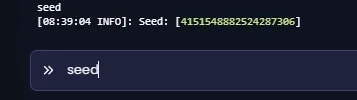
Consoletab. - In the command input line, type the prompt without the
/prefix:seed - The terminal output will instantly return a message reading:
Seed: [Numerical Value].
Method 7: Via the server.properties File (Server)
If your server process is currently stopped or if you prefer managing parameters through system files:
- Head over to the
File managerwindow inside your gaming panel. - Open the
server.propertiesfile. - Search the document lines for the following string:
level-seed=.
If the value following level-seed= is blank, the server generated a completely randomized seed upon creation. To get the actual numerical layout, you must use Method 1 or Method 4 while the server is online.
Leveraging and Protecting Your Seed: Pro Secrets
To maximize the performance and security of your gaming network, here are three vital mechanics related to world seeds in 2026.
1. Instantly Map Your World Using Chunkbase
Once you retrieve your seed, you can input it into specialized mapping platforms like Chunkbase. This web utility allows you to instantly track down:
- Slime Chunks (essential for building resource farms).
- Rare points of interest (Ancient Cities, Nether Fortresses, Trial Chambers).
- Exact structural coordinates for specific biomes to streamline complex build projects.
2. Java & Bedrock Parity: One Seed, Two Editions
Following updates to Mojang's unified landscape generation algorithm (fully standardized since 1.18), Java and Bedrock world seeds are now completely identical. If you find a stunning map layout on your Winheberg Java server, you can reuse the exact same seed on Minecraft PE (Pocket Edition) or console networks—the terrain and biome structures will match block-for-block.
3. Server Security: How to Hide Your Seed to Stop Cheaters
On competitive setups (Factions, Survival, Ultra Hardcore), any player who gains access to the seed can cheat by mapping out hidden structural assets and diamonds ahead of time. To completely stop tools like SeedCrackerX, you must obufscate your network data:
- If you are running a Paper or Purpur infrastructure, open your
config/paper-world-defaults.ymlfile. - Locate the structure obfuscation components and alter your
feature-seedsconfigurations. - Alternatively, deploy the AntiSeedCracker plugin. This software injects dummy data packets into game clients, breaking the decryption routines used by reverse-engineering mods.
Frequently Asked Questions (FAQ)
How do I resolve the "You do not have permission" error with the /seed command?
This notification highlights a strict lack of system clearance on the Minecraft server. To fix this restriction, elevate your player rights by inputting op YourUsername within the master terminal. If you prefer utilizing advanced structural role delegation instead, explicitly append the node setting through LuckPerms configuration rules:
/lp user YourUsername permission set minecraft.command.seed true
To permanently bypass internal in-game restriction mechanics, reviewing the generation variable value from the panel daemon console interface is the most optimal way. Additionally, make sure network traffic routing rules are properly mapped if your backend utilizes proxies such as BungeeCord or Velocity.
Why does the remote panel console print "Unknown command" when executing seed?
The system console shell interpreter does not recognize standard in-game punctuation formatting: make sure to remove the leading slash / symbol when issuing admin actions. If input parsing routines keep failing, give yourself temporary OP rank inside the game and use the native routine. Niche software implementations or heavily modified hybrid cores might overlay or hide standard system endpoints. Refreshing your core server binary build (Paper, Spigot, Fabric) typically straightens out these framework issues. Alternatively, the seed can be extracted by reading the binary structural values of the main database directly.
What is the exact path layout to find the level.dat save asset?
Global variables and framework configurations are located directly within the primary save path allocated to your world storage maps (e.g., /world/level.dat). On high-performance configurations that separate dimensional map storage directories (Spigot/Paper), files are isolated into independent storage nodes: /world/level.dat, /world_nether/level.dat, and /world_the_end/level.dat. To extract the original seed layout variables, download the data asset onto your workspace and look over its compressed database hierarchy using an NBT parsing application.
Does modifying the level-seed= property script overwrite my current map configurations?
No, it does not. Changing the configuration variable value inside your server.properties script has no retroactive effect on any regional save chunks that have already been generated and written to your server drive. This parameter is used as a template model purely during the baseline compilation of a completely fresh world instance. If you want to deploy alternative world landscapes, wiping your existing map data files is required. Be sure to secure your active world assets using the backup software tool before discarding any storage files.
Need Assistance?
You are now fully in control of your server's seed parameters. All that's left is to configure a high-performance gaming environment and share your top-tier map coordinates with your player community!
If the extracted generation layout does not match your in-game coordinates, make sure the string sequence is complete (including negative indicators like the minus - prefix) and double-check that your game client update version aligns exactly with the original server engine environment.
If you encounter persistent technical setup errors or data management issues, get in touch with our team by opening an intervention request in the Winheberg Client Area or chat live with our support staff via the official Discord server.
Have an awesome time managing and playing on your Minecraft Java server instance! 🎮