Context
The wipe is a Rust ritual. The map is reset, sometimes the crafting plans (blueprints) too, and everyone starts again on an equal footing. Facepunch forces a map wipe on every server each month, with the mandatory game update, and many communities add more in between, every week or every two weeks.
This guide explains the different types of wipe and how to perform them on your Winheberg Rust server, either by changing the map from the panel or by deleting the right save files.
Prerequisites
- An active Rust server on your Winheberg gaming panel
- A recent backup from the Backups tab, a wipe cannot be undone without one
A wipe permanently deletes buildings and, depending on the type, player progress. Always make a backup first, and let your community know the date and time.
1. Types of wipe
| Type | What is reset | What is kept |
|---|---|---|
| Map wipe | Buildings, items, map | Blueprints learned by players |
| Blueprint wipe | Learned blueprints | Map and buildings |
| Full wipe | Map and blueprints | Server configuration, plugins, administrators |
The Facepunch monthly wipe is a map wipe. Blueprints are not erased, unless you delete them yourself at the same time.
2. How the server stores the map
Saves are located in the server/rust folder of the file manager. The map save name contains the size, the seed and the game's protocol number, for example proceduralmap.3000.68894.285.sav. The .sav.1 and .sav.2 files are automatic backup copies.
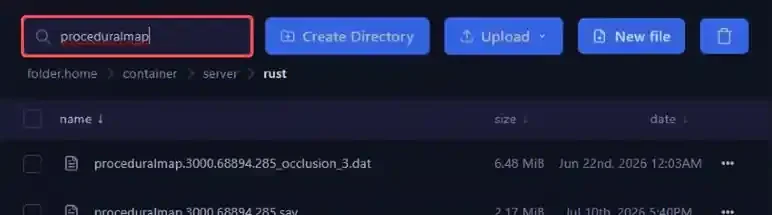
This name explains how wiping works. If the size, seed or protocol changes, the server no longer finds a save with that name and generates a brand new map. That is exactly what happens during the monthly wipe, the protocol number goes up with the Rust update and the map resets on its own.
3. Wipe the map by changing the seed
This is the simplest method, and players discover a new map.
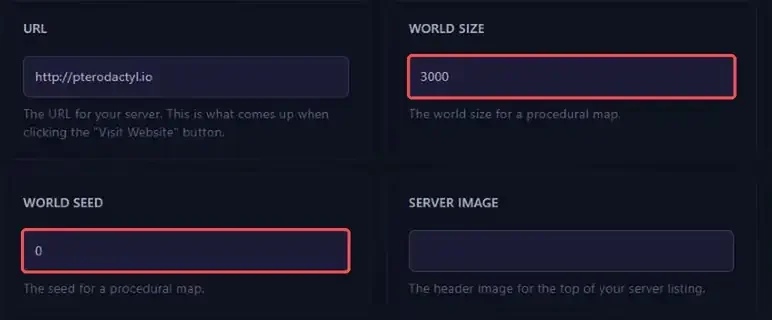
- Open Startup and find the WORLD SEED and WORLD SIZE variables
- Replace the WORLD SEED value with a number between
0and2147483647 - If you like, adjust WORLD SIZE. Facepunch recommends a size between
1000and6000, the bigger the map, the more players and resources it needs - Go back to the Console and click Restart
The first startup on a new map takes several minutes while it is generated. The console shows the generation steps one by one.
With the value 0 in WORLD SEED, the server uses the seed saved in the seed.txt file, at the root of the server. It was picked at random during installation, which is why your map does not change by itself.
To choose a map before putting it online, sites like RustMaps let you preview a given seed and size.
4. Wipe the map while keeping the same seed
To reset the same map without changing it, delete its save.
- Stop the server with Stop
- Open Files, then
server, thenrust - Type
proceduralmapin the search bar to show only the map files - Tick all the files shown and delete them with the trash icon
- Start the server with Start
The server regenerates the same map, completely fresh.
5. Wipe blueprints
Blueprints learned by players are stored separately, in the same server/rust folder.
- Stop the server with Stop
- In
server/rust, typeplayer.blueprintsin the search bar - Delete the
player.blueprints.XX.dbandplayer.blueprints.XX.db-walfiles - Start the server with Start
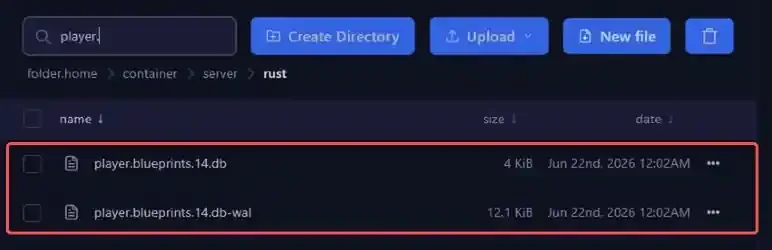
For a full wipe, combine both, delete the proceduralmap and player.blueprints files during the same stop, or change the seed and delete the blueprints.
Do not delete the companion.id file, nor the cfg folder, which contains your list of administrators and banned players. Deleting player.tokens.db forces every player to pair the Rust+ app again.
6. Use a custom map
For a handmade map instead of a procedural one, paste the direct download link of the .map file into the CUSTOM MAP URL variable in the Startup tab, then restart. The WORLD SIZE and WORLD SEED variables are then no longer used. To go back to a procedural map, simply clear this field.
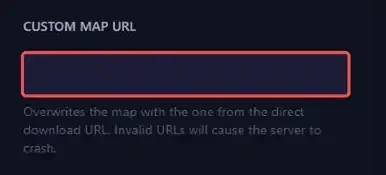
The link must point directly to the .map file, not to a web page. An invalid link prevents the server from starting.
If you run into trouble
❌ The map did not change after the restart
- Check that the new WORLD SEED value is actually saved in Startup
- Check that CUSTOM MAP URL is empty, otherwise the custom map is used instead
- If you deleted files, check that the server was really stopped, it rewrites its save while running
❌ Players kept their blueprints
That is normal after a map wipe. Delete the player.blueprints files with the server stopped, as described in step 5.
Best practices
- Announce the wipe date in advance, it is when your server attracts the most players
- Line up your wipes with the Facepunch monthly wipe, the map is reset that day anyway
- Clean up from time to time, saves from old maps stay in
server/rustand take up disk space - Automate the restart before your wipe with Schedules, as explained in our guide How to Schedule Automatic Restarts with Schedules
To keep up with the content of the latest updates, also read our article Rust, the October 2026 Livestock Update and What Changes for Your Server.
Need help?
If the server does not restart after a wipe, our team is here to help. Open a ticket in the Technical department from your client area, fill in the Related Product field with your Rust server and attach the last lines of the console.
Check out our plans on the Rust Hosting page. Happy wiping to your whole community 🎮