Context
Your Winheberg DayZ server starts on Chernarus by default, but it also ships with Livonia, ready to use. Switching from one to the other needs no reinstall and no outside tool, a single line in the serverDZ.cfg file decides which map loads at startup.
This guide shows you how to change the map of your DayZ server from the Winheberg panel, and what happens to player progress when you move from one map to the other.
Prerequisites
- An active DayZ server on the Winheberg panel, with its installation complete
- Access to the panel's Files manager, or an SFTP connection
Only Chernarus and Livonia are provided ready to use on your server, so this guide covers these two maps.
1. Stop the server and back it up
Log in to the Winheberg panel and select your DayZ server. Stop it with the Stop button and wait until it has fully stopped before touching its configuration.
Next, create a backup from the Backups tab, in the MANAGEMENT section of the side menu. If you make a typo, you can get back to the current state in a few clicks. The full procedure is covered in our guide How to Create and Restore a Backup of Your Gaming Server.
2. Find the map folder
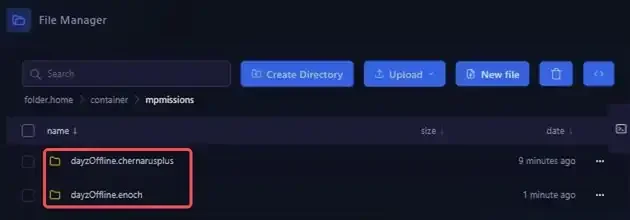
Open Files in the side menu, then the mpmissions folder. It holds one mission folder per available map.
| Map | Mission folder |
|---|---|
| Chernarus | dayzOffline.chernarusplus |
| Livonia | dayzOffline.enoch |
The name of this folder is exactly the value to enter in serverDZ.cfg in the next step.
Do not rename or delete these folders. Each one also holds the progress saved on its map.
3. Edit the template line in serverDZ.cfg
Go back to the server root and open the serverDZ.cfg file. Scroll down to the class Missions section, which contains the template line. By default, it points to Chernarus.
class Missions
{
    class DayZ
    {
        template="dayzOffline.chernarusplus";
    };
};
Replace the value between quotes with the folder of the map you want, keeping the quotes and the trailing semicolon.
| Target map | Line to write |
|---|---|
| Chernarus | template="dayzOffline.chernarusplus"; |
| Livonia | template="dayzOffline.enoch"; |
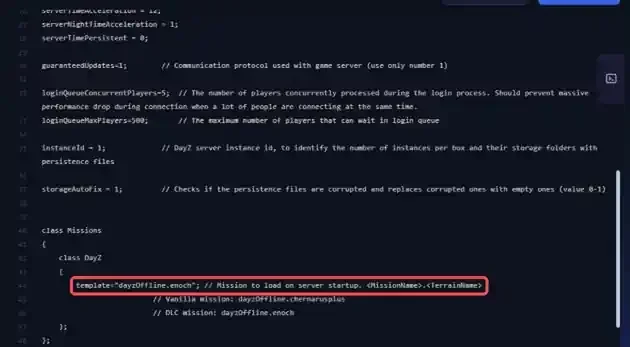
Click Save Content to save the file.
The Startup tab has no map setting. At every start, the panel rewrites the values it manages from that tab, such as the server name, but the template line is not one of them. Your change is therefore kept when the server restarts.
You can also edit the file from your computer with an SFTP client. Our guide How to Connect to Your Gaming Server via SFTP explains how to connect.
4. Start the server on the new map
Click Start. A DayZ server takes a few minutes to boot, the status goes from Starting to Online, and the server then runs on the map you chose.
On its first start on Livonia, the server creates the mpmissions/dayzOffline.enoch/storage_1 folder, where it saves the progress for that map.
5. Understand each map's progress
Each map keeps its own progress, in the storage_1 folder of its mission folder. It holds, among other things, the player file players.db and the world data in data.
| Map | Progress folder |
|---|---|
| Chernarus | mpmissions/dayzOffline.chernarusplus/storage_1 |
| Livonia | mpmissions/dayzOffline.enoch/storage_1 |
The first time you switch to Livonia, progress on that map therefore starts from scratch, while Chernarus progress stays untouched in its own folder. By setting template="dayzOffline.chernarusplus"; again, you get back the progress left on Chernarus.
Let your players know before switching maps, their characters do not carry over from one map to the other.
If you run into trouble
❌ The server still starts on Chernarus
- Check that the
serverDZ.cfgfile was saved with Save Content - Check that you edited the
templateline in theclass Missionssection - Check that the value matches the folder name in
mpmissionsexactly, with the quotes and the trailing semicolon
❌ Players can no longer find their characters
- This is normal after a map change, each map has its own progress
- Set the previous map back in the
templateline to get back the progress saved on it
Need help?
If your server no longer starts after the map change, or if you are unsure before editing serverDZ.cfg, our team is here. Open a ticket in the Technical department from your client area, fill in the Related Product field with your DayZ server, and specify the target map along with the template line you used.
Your DayZ server now runs on the map of your choice 🎮