Context
To kick a player, ban a cheater or run your team on your Garry's Mod server, you need an administrator rank. Garry's Mod has two built-in ranks, superadmin and admin, granted using the player's SteamID.
This guide covers two methods on your Winheberg Garry's Mod server. The users.txt file, shipped with the game, is enough to grant a rank without installing anything. The ULX addon adds full administration commands and an in-game menu.
Prerequisites
- An active Garry's Mod server on your Winheberg gaming panel
- The SteamID of the player to promote, in the
STEAM_0:X:XXXXXXXXformat, as explained in step 1 - For ULX, a public Steam Workshop collection, as explained in our guide How to create a Steam Workshop collection?
1. Find the player's SteamID
Garry's Mod uses the SteamID in the STEAM_0:1:12345678 format, not the 17-digit SteamID64. To get it, paste the player's Steam profile URL into a converter such as steamid.io, then copy the steamID line.
A SteamID64 (7656119...) or a SteamID starting with STEAM_1: matches no player, so the rank never applies.
2. Grant a rank with the users.txt file
Open Files, then the garrysmod/settings/users.txt file. Add a line in the "superadmin" or "admin" section, with a name in quotes followed by the SteamID in quotes.
"superadmin"
{
	"MyName"	"STEAM_0:1:12345678"
}
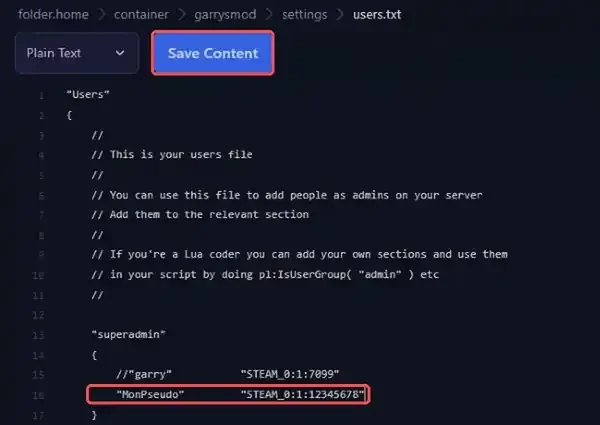
The name is only a label. Lines starting with // are disabled examples, so leave them as they are. Click Save Content, then restart the server with Restart.
The file is only read when the map loads. The rank applies when the player joins the server after the restart.
3. Install ULX and ULib
ULX needs the ULib library to work. Add both official addons to your Workshop collection.
| Addon | Workshop ID |
|---|---|
| ULib | 557962238 |
| ULX | 557962280 |
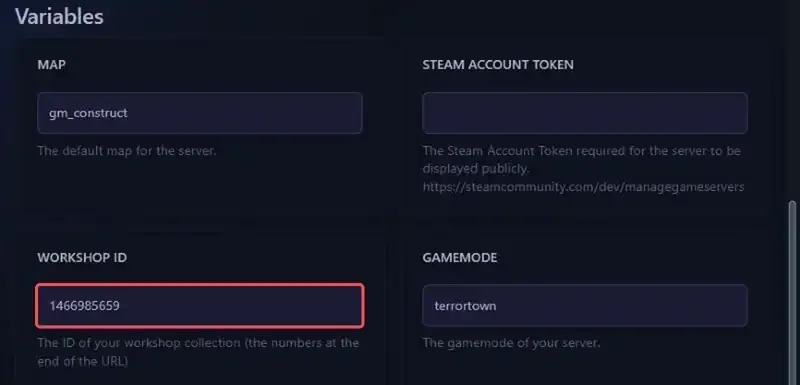
Enter your collection ID in the WORKSHOP ID variable of the Startup tab, then restart the server. The method is detailed in our guide How to install mods on your Garry's Mod server
4. Grant a rank with ULX
Open the panel Console and type the command in the Type a command... field, without a / in front, replacing the SteamID.
ulx adduserid "STEAM_0:1:12345678" superadmin
The console confirms the change.
(Console) added userid STEAM_0:1:12345678 to group superadmin

This command works even if the player is offline. For a player who is on the server, ulx adduser followed by their name and the rank gives the same result. ULX comes with four default ranks, each one inheriting the rights of the rank below.
| Rank | Place in the hierarchy |
|---|---|
superadmin |
Highest rank, the only one allowed to manage ranks by default |
admin |
Inherits the rights of operator |
operator |
Intermediate rank, handy for a moderation team |
user |
Default rank of every player |
ULX ranks are saved automatically and survive restarts.
Since ULib 2.72, released in August 2025, ranks are stored in the garrysmod/sv.db database, no longer in data/ulib/users.txt. There is no need to look for that file to check a rank.
Use a single method per player. When ULX is installed, a ULX entry overrides users.txt for the same player.
5. Use ULX in game
Once promoted, a player types !menu in the chat to open the ULX administration menu. Common commands are also available straight from the chat, such as !kick or !ban followed by the target player's name.
6. Remove a rank
With ULX, type this command in the panel Console.
ulx removeuserid "STEAM_0:1:12345678"
The console confirms the removal.
(Console) removed all access rights from STEAM_0:1:12345678

For a connected player, ulx removeuser followed by their name also works. With the users.txt method, delete their line from the file, click Save Content and restart the server.
If you run into trouble
❌ The console replies 'Unknown command "ulx"'
ULX is not loaded on the server.
- Check that both ULib and ULX are part of your collection
- Check that WORKSHOP ID holds the collection ID, and that the collection is public or unlisted
- Restart the server and check in the console that the addons are downloaded
❌ The rank does not apply
- Check that the SteamID uses the
STEAM_0:X:XXXXXXXXformat, not a SteamID64 or aSTEAM_1:ID - With
users.txt, check the quotes and the section, then restart the server - Ask the player to disconnect and reconnect
- If ULX is installed, check that an old ULX entry does not give them another rank
Best practices
- Keep the
superadminrank for people you trust, as theadminandoperatorranks are enough for most members of a team - To delegate server management, use a sub-user with limited permissions instead, as explained in our guide How to Add a Sub-User to Your Gaming Panel
- Remove the ranks of a member who leaves your team
- Keep a list of your team's SteamIDs, to quickly find out who holds which rank
Need help?
If the ranks still do not apply after these checks, our team is here to help. Open a ticket in the Technical department from your client area, fill in the Related Product field with your Garry's Mod server and attach a screenshot of the console.
Check out our plans on the Garry's Mod Hosting page. Your Garry's Mod server is now in good hands 🔒