Context
Garry's Mod is not limited to sandbox mode. The same server can run Trouble in Terrorist Town (TTT), DarkRP or another game mode, called a gamemode, on the map of your choice.
On your Winheberg Garry's Mod server, the gamemode and the startup map are set from the Startup tab of the panel. This guide shows you how to switch between the gamemodes that ship with the game, how to add a Steam Workshop gamemode such as DarkRP, and how to change the map.
Prerequisites
- An active Garry's Mod server on your Winheberg gaming panel
- For a Workshop gamemode or map, a public Steam Workshop collection, as explained in our guide How to create a Steam Workshop collection?
1. Find the available gamemodes
The panel expects the name of the gamemode folder, not its display name. Open Files, then the garrysmod/gamemodes folder to see the gamemodes that ship with the game.
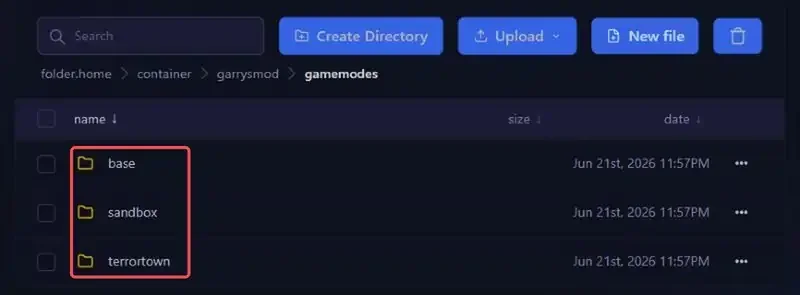
| Folder | Gamemode |
|---|---|
sandbox |
Sandbox, the default sandbox mode |
terrortown |
Trouble in Terrorist Town (TTT) |
base |
Common foundation the other gamemodes build on |
For TTT, the value to enter is terrortown, not ttt.
2. Change the gamemode and the map
Open the Startup tab of your server. Two variables matter here.
| Variable | Purpose |
|---|---|
| MAP | Map loaded at startup, for example gm_flatgrass or gm_construct, both shipped with the game |
| GAMEMODE | Gamemode of the server, for example sandbox or terrortown |
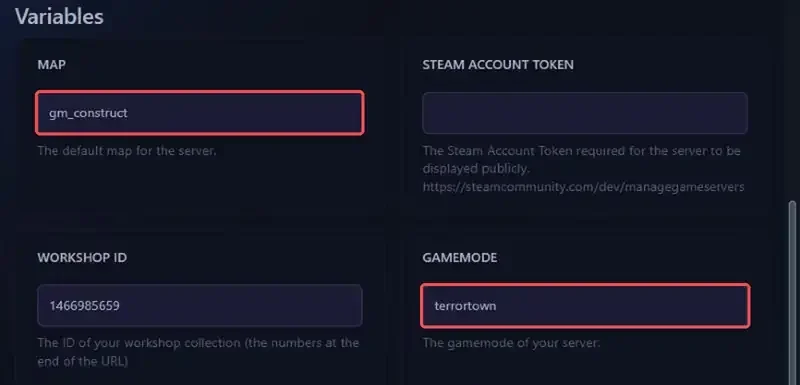
Enter the new value, click outside the field to save it, then restart the server with Restart. At startup, the console confirms that the gamemode is loading. With TTT, you will see this line.
Trouble In Terrorist Town gamemode initializing...

TTT is built for maps whose name starts with ttt_. On another map, weapons may not spawn. Add a TTT map to your Workshop collection, as explained in step 4.
3. Install a Workshop gamemode such as DarkRP
Other gamemodes, such as DarkRP, are installed from the Steam Workshop.
- Add the gamemode to your Workshop collection. For DarkRP, this is the official DarkRP addon, ID
248302805 - Enter your collection ID in the WORKSHOP ID variable of the Startup tab, as explained in our guide How to install mods on your Garry's Mod server
- Enter the gamemode folder name in GAMEMODE, here
darkrp - Restart the server
At startup, the server downloads the content of the collection, then loads the gamemode. If you do not know the folder name of a gamemode, check the description of its addon on the Workshop.
WORKSHOP ID expects the ID of a collection. If you enter the ID of a single addon, the server downloads nothing.
To customise DarkRP (jobs, settings), the DarkRP team provides the darkrpmodification addon, which you download from its official GitHub and upload to garrysmod/addons over SFTP. This way your settings stay intact when DarkRP updates. To upload the files, follow our guide How to Connect to Your Gaming Server via SFTP
4. Use a Workshop map
- Add the map to your Workshop collection
- Find the exact file name of the map, without the
.bspextension. It can differ from the title shown on the Workshop, so check it in the map description - Enter this name in MAP, then restart the server
When the startup map is part of the collection, the server automatically offers it for download to players who connect.
To change the map without restarting, type changelevel followed by the map name in the panel Console, without a / in front. Players stay connected.
changelevel gm_construct
changelevel does not change the MAP variable. On the next restart, the server goes back to the map set in the Startup tab.
If you run into trouble
❌ The console shows "'darkrp' not found"
Mounted 0 of 0 workshop addons!
Couldn't change active gamemode - 'darkrp' not found

The server cannot find the gamemode set in GAMEMODE.
- If the console shows
Mounted 0 of 0 workshop addons!, no addon was downloaded. Check that WORKSHOP ID holds the ID of a collection, not the ID of a single addon - Check that your collection is public or unlisted, and that it contains the gamemode
- Check that GAMEMODE matches the gamemode folder name exactly, for example
darkrp
❌ The server does not start on the right map
- Check that MAP holds the map file name, without the
.bspextension - Compare this name with the map description on the Workshop, as it sometimes differs from the title
- Check that the map is part of the collection set in WORKSHOP ID
Best practices
- Make a backup before changing gamemode, as explained in our guide How to Create and Restore a Backup of Your Gaming Server
- Group gamemode, maps and addons in a single collection, so that your players download exactly the same content as the server
- For TTT, prefer
ttt_maps, designed to spawn weapons - Note the original values,
sandboxandgm_flatgrass, to roll back quickly
Need help?
If your gamemode refuses to load after these checks, our team is here to help. Open a ticket in the Technical department from your client area, fill in the Related Product field with your Garry's Mod server and attach a screenshot of the console.
Check out our plans on the Garry's Mod Hosting page. Enjoy your Garry's Mod server 🎮