Context
When creating a server in the server manager, you must choose a starting zone. This choice directly influences your early game, available resources, and overall progression difficulty.
This guide presents the different regions available to set up your first factory on your Satisfactory server and explains how to change your zone if necessary. If your server is not added to the game yet, start with How to Join Your Satisfactory Server
Choosing the Starting Zone
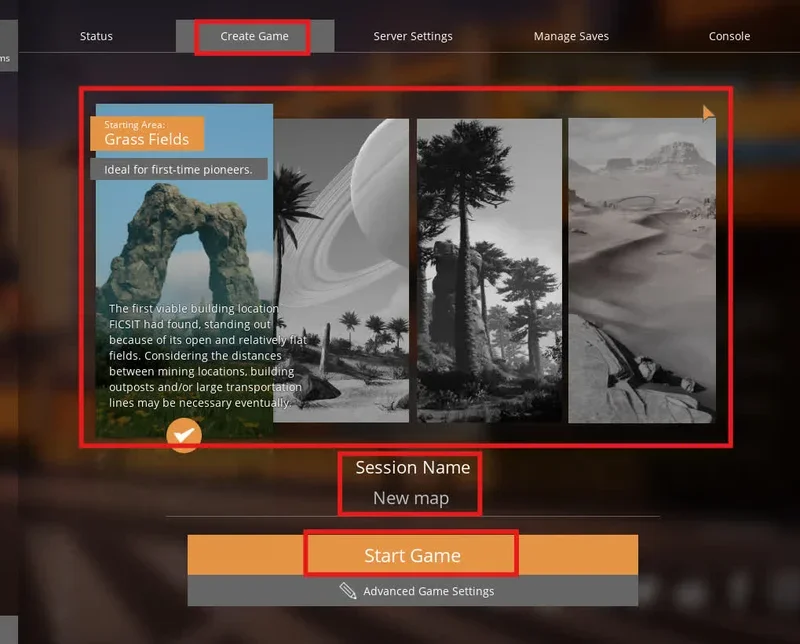
When creating a new game session on your server, you can select your starting area via the Create Game tab.
Four main zones are available for players:
- 🌱 Grass Fields, ideal for beginners: Satisfactory's primary starting area, featuring flat terrain that makes building and starting out easy. However, basic resources are further apart and sometimes require early transportation setups.
- 🪨 Rocky Desert, adapted to new players: A well-balanced zone regarding building space and resource nodes. It offers a great compromise between accessibility and variety, with nearby water for your early industrial setup.
- 🌲 Northern Forest, for experienced players: An area extremely rich in mineral resources, characterized by very complex terrain. The heavy elevation changes require careful planning.
- 🏜️ Dune Desert, recommended for experts: A massive open area packed with high-quality resources. The initial scarcity of water and vegetation makes the early game much more challenging and demanding.
Once your zone is selected, enter a session name in the dedicated field, then click on the Create Game button.
Modifying the Zone After Creation
If you have already launched your game on Satisfactory and want to change regions, two options are available:
1. Create a new session
The simplest and cleanest method is to recreate a new session directly via the server manager by selecting a different starting zone. To start completely from scratch and delete the old save, follow How to reset your Satisfactory world
2. Move your HUB
You can also choose to manually move your existing HUB in-game. The HUB acts as the central point of your progression and can be freely repositioned elsewhere on the map if you decide to relocate your facilities.
Troubleshooting
❌ Unable to start the game after selecting the zone
- Version verification: Ensure that both your game and the server are running on the exact same version. Restart the server from your panel if an update was just deployed.
- Invalid session name: Avoid using special characters or accents in the session name, as this can block the initial map generation.
- "Connection Timed Out" message while loading the new world, follow How to Fix the "Connection Timed Out" Error on Satisfactory
Best Practices
A few tips for choosing your first location wisely.
- Start with the Grass Fields if you are discovering the game for the first time, to familiarize yourself with the interface and building without excessive pressure
- Choose the Northern Forest if you are looking for a challenge focused on fast optimization and abundant pure ores
- Save your world state before attempting a complete relocation of your production structures
Need help?
If you encounter difficulties configuring your server or generating your Satisfactory world, our support team is here to help. Open a support ticket from your client area at billing.winheberg.com to get technical assistance.
Your zone is now configured, and your factory is ready to run smoothly 🎮.