Context
Resetting your Satisfactory world allows you to start fresh on your Satisfactory server. This operation is useful if you want to begin a clean playthrough or fix an issue caused by a corrupted save file.
You can perform this reset in two ways: from the game (recommended method) or via the Winheberg panel files.
1. Resetting from the game
This is the easiest method and allows you to reset the world directly without needing to touch your server files.
1.1 Access your server in-game
- Launch your Satisfactory game.
- From the main menu, click on Server Manager.
- Select your dedicated server from the list (if it is not listed yet, follow How to Join Your Satisfactory Server).
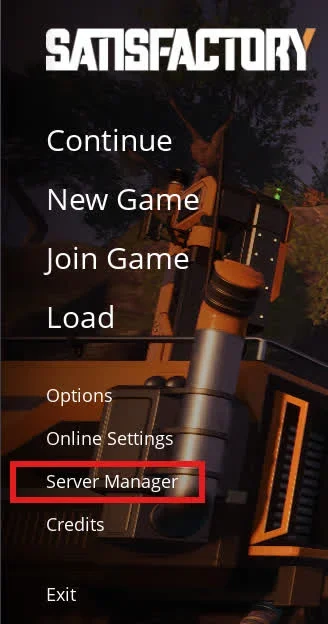
1.2 Create a new game
- Click on Create Game.
- Choose your starting area (see How to Change the Starting Area of Your Satisfactory Server).
- Enter a new session name.
- Click on Start Game.
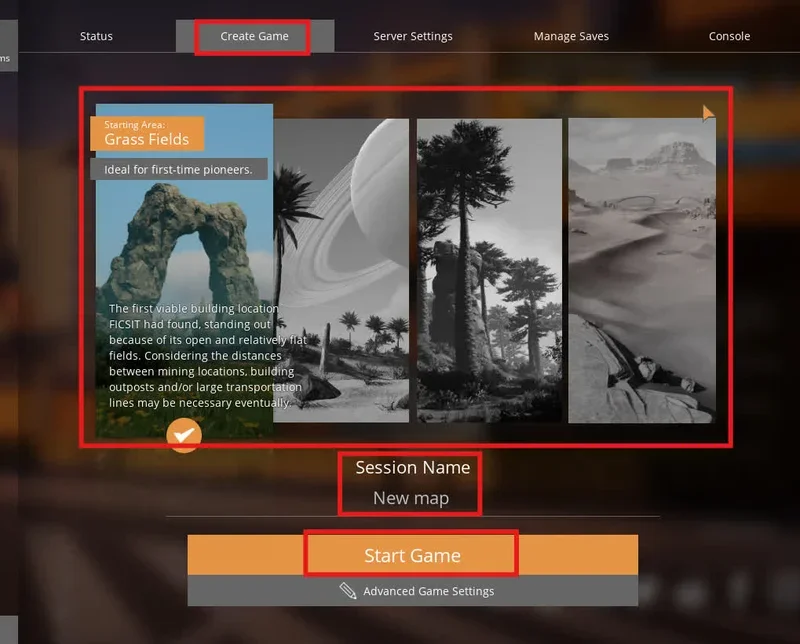
If the first load of the new world fails with Connection Timed Out, see How to Fix the "Connection Timed Out" Error on Satisfactory
2. Resetting via the panel (Files)
2.1 Access the server files
- Log in to your Winheberg panel and select your Satisfactory server.
- Stop the server (Stop button) before proceeding.
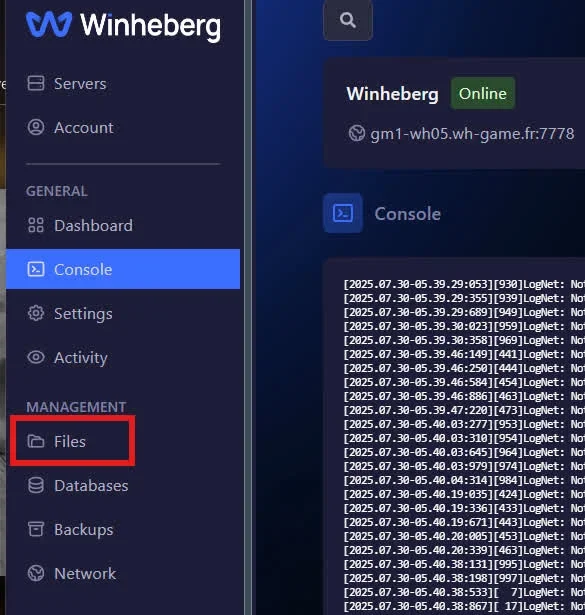
- Go to the Files tab in the left sidebar menu.
2.2 Delete existing save
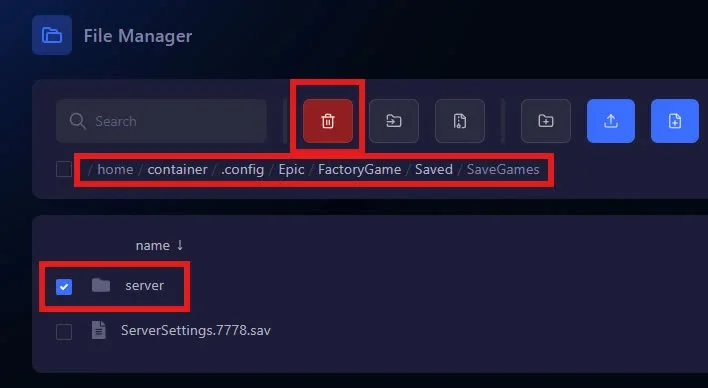
Navigate to the following path by clicking on the folders:
/.config/Epic/FactoryGame/Saved/SaveGames/
- Delete the save file named
Server. - Restart the server. A fresh new world will automatically generate.
Make sure the server is completely stopped before deleting any files. If the server is running during the deletion process, the save may recreate itself or become corrupted.
Troubleshooting
❌ Cannot delete the save file
- Server is still running: The panel often prevents the deletion of files currently in use by the server. Ensure the server status shows as Offline in the console before attempting to delete the
Serverfile.
❌ The old world still loads
- Wrong file: Double-check that you deleted the
Serverfile located inside.config/Epic/FactoryGame/Saved/SaveGames/on your panel. Restart the server once confirmed.
Best Practices
Before permanently deleting your save file, remember to create a full server backup from the Backups tab on the panel. This will allow you to recover your old factory if you change your mind.
Need help?
If your world does not reset properly or if you encounter an error during the process, feel free to contact the Winheberg support team. Our staff can help you restore a backup or check your server configuration.
Your new Satisfactory world is now ready 🚀