Context
Your Winheberg web hosting can run Rack-based Ruby applications, such as those written with Sinatra, Roda or Hanami. Plesk serves them with Phusion Passenger, which starts your application on the first visit and keeps it in memory.
The Plesk Ruby extension handles the Ruby version, the installation of the gems listed in your Gemfile and the application restart. You need no command-line access.
This guide covers the expected folder layout, the website root setting, enabling Ruby, installing gems and the most common errors.
The Winheberg Plesk panel is displayed in French. Menu, field and button names are quoted below exactly as they appear on screen, followed by their English meaning.
Prerequisites
- A Winheberg web hosting plan with access to the Plesk panel
- A domain or subdomain dedicated to the application, see our guide How to Connect an External Domain to Your Plesk Hosting
- Your application, with its
config.rufile and itsGemfile
An application that needs to run command-line tasks, such as Ruby on Rails migrations, requires SSH access. If your plan does not open it, a Winheberg VPS gives you full control of the server.
1. Prepare the application layout
Plesk expects a specific layout. The application folder holds config.ru and the Gemfile, and a public subfolder receives static files such as images or stylesheets.
| Item | Location |
|---|---|
| Application folder | app.example.com |
| Startup file | app.example.com/config.ru |
| Gem list | app.example.com/Gemfile |
| Static files | app.example.com/public |
To test the hosting before uploading your real application, here is a minimal application. The config.ru file holds the application itself.
run lambda { |env|
  [200, { "content-type" => "text/html; charset=utf-8" }, ["<h1>Bonjour depuis Ruby #{RUBY_VERSION}</h1>"]]
}
The Gemfile declares the rack gem it needs.
source "https://rubygems.org"

gem "rack"
Upload these files to the application folder with the Plesk Fichiers (Files) manager, or with our guide How to Connect to Your Plesk Hosting over FTP with FileZilla
2. Point the website to the public folder
Open your domain from Sites Web & Domaines (Websites & Domains), then the Hébergement et DNS (Hosting & DNS) tab and the Hébergement (Hosting) entry. In Racine du document (Document root), add /public to the application folder path, then click Enregistrer (Save).
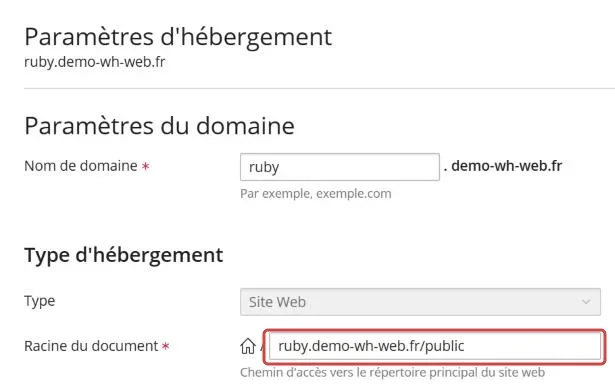
Plesk then creates the public folder if it does not exist, with its default index.html page. Delete this file from the Fichiers manager, otherwise it is what shows at your website address instead of your application.
3. Enable Ruby
In the domain Démarrer (Get Started) tab, click Ruby, then Activer Ruby (Enable Ruby).
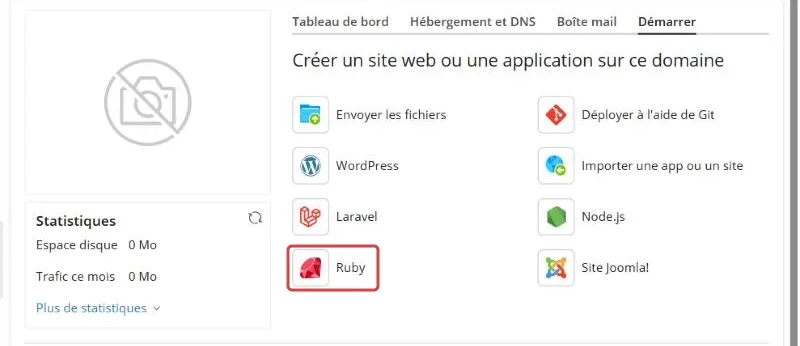
The Ruby page then shows the application settings and its action buttons.
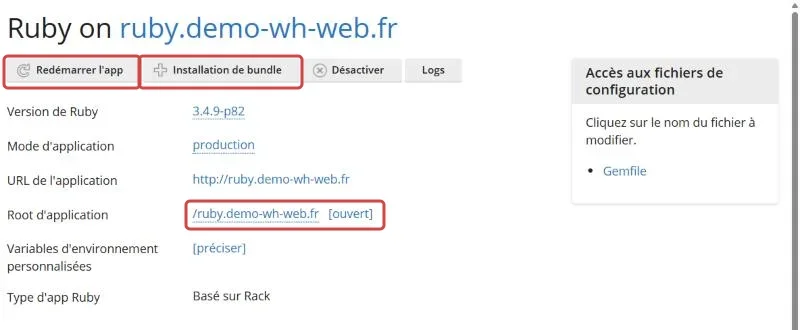
| Setting | What it shows |
|---|---|
| Version de Ruby (Ruby version) | The version used by the application, which you can change by clicking it |
| Mode d'application (Application mode) | production, the mode to keep for a live website |
| Root d'application (Application root) | The application folder, always the parent folder of the website root |
| Variables d'environnement personnalisées (Custom environment variables) | The variables passed to the application, set with préciser (specify) |
| Type d'app Ruby (Ruby app type) | Basé sur Rack (Rack-based), detected from the config.ru file |
Check that Root d'application shows your application folder, for instance /app.example.com. If it shows /, the website root was not set to the public folder, go back to step 2.
4. Install the gems
Click Installation de bundle (Bundle install). Plesk reads your Gemfile, installs the gems in the application vendor folder and creates the Gemfile.lock file.
Run Installation de bundle again after every change to the Gemfile.
5. Restart and test the application
Click Redémarrer l'app (Restart App), then open your domain in a browser. The minimal application shows the Ruby version in use.

Remember to Redémarrer l'app after every upload of a new version of your code, otherwise Passenger keeps the old one in memory.
Troubleshooting
❌ The Ruby page says "Fichier de démarrage /config.ru introuvable"
Plesk looks for config.ru (startup file not found) in the parent folder of the website root, and does not find it there.
- Check that the Racine du document ends with
/public, as in step 2 - Check that
config.rusits in the application folder, not inpublic - Reload the Ruby page, Root d'application should show the application folder
❌ The default Plesk page shows instead of the application
Passenger first serves the files present in public, including the default page created by Plesk.
- Delete
public/index.htmlfrom the Fichiers manager - Reload your website without cache with Ctrl+F5
❌ The application returns an error after an update
A gem is missing or the application kept the old version in memory.
- Run Installation de bundle again, then Redémarrer l'app
- Open the Logs button of the Ruby page to read the error message
- If a gem fails to compile during installation, open a ticket with our support and attach the message
Best practices
- Keep the production mode for the public website
- Store your keys and passwords in the Variables d'environnement personnalisées, never in the code
- Commit the
Gemfile.lockfile, it ensures the same gem versions locally and on the hosting - Only put static files in
public, the rest of the application must not be reachable from the web - Turn on HTTPS with our guide How to Generate a Let's Encrypt SSL Certificate for Your Website
Need help?
If your application still does not start, open a ticket with our support from your client area, Technical department, filling in the Related Product field with the web hosting concerned. Attach the content of the Logs of the Ruby page and the Ruby version in use.
Your Ruby application runs on your hosting, without a single command line 💎